 Metwith
What to put on a business card
A business card has one job: to let someone reach you, and remember why they should. Every line on it should help with one of the two.
What to put on it
- Your name, the way you introduce yourself, with a title if your field uses one (Dr., Arch., Dott.).
- What you do, in words a stranger understands. “Lighting designer” says more than “Senior associate”.
- Your company and its logo.
- One phone number you answer, with the country code if you meet people from abroad.
- One email you read.
- A website or one profile, like LinkedIn, so people can check who you are.
- An address only if people come to you: a shop, a studio, a showroom.
What to leave off
- Every number you’ve ever had. Two phones and a fax make people guess.
- A list of every social network. Pick the one you use for work.
- Tiny type, and light grey on white. Cards are read at arm’s length, often in a dim hall, and scanners read clear cards best.
Add a QR code
A QR code that holds your contact lets anyone save you by pointing their camera at it, with nothing to type. Put it on the back of your paper card, or show it from your phone or your watch. How a contact QR code works
The same card, on your iPhone
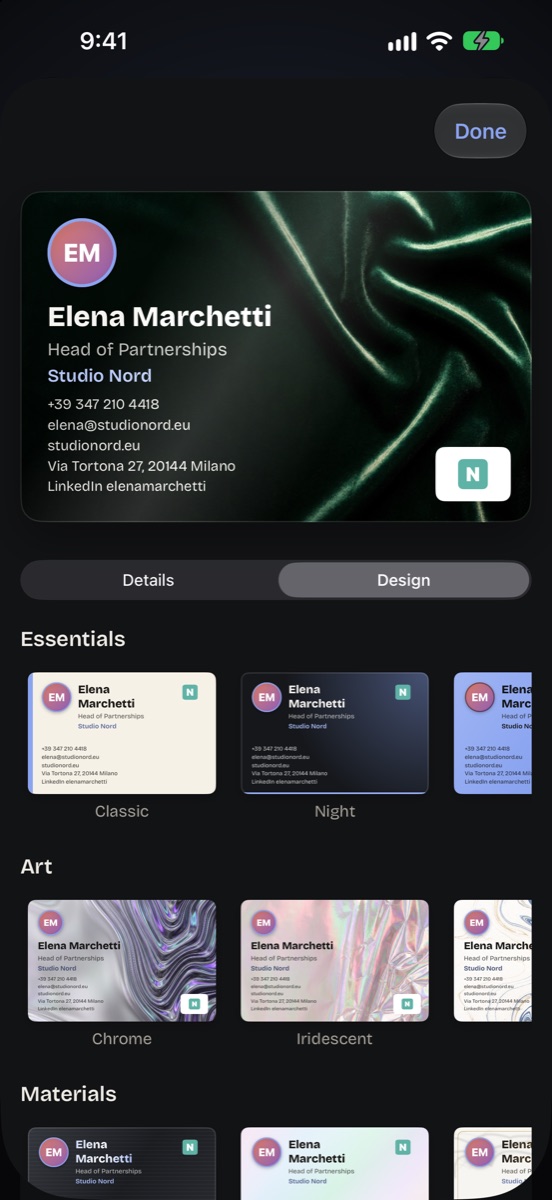
In Metwith you make your card from these same lines, or scan your paper one and it fills them in. Then it’s a 3D card with its QR code on the back, on your Home Screen and your Apple Watch. Extra lines take LinkedIn, Instagram, WhatsApp or anything else, so the paper card can stay short.
Questions
What are the essentials of a business card?
Your name, what you do, your company, one phone number you answer and one email you read. Add a website or one profile if it helps people check who you are.
Should a business card have a QR code?
It helps: a QR code that holds your contact lets anyone save you with their phone's camera, without typing. Metwith makes one for free.
Do I still need a paper card?
Many people still hand them out at fairs. A digital card with a QR code covers the rest, and some people put an NFC sticker on the back of the paper one.
Make your card with its QR code in Metwith. Free, no account.
Download on the App Store