 Metwith
Your business card on an NFC sticker
Write your card’s link to a blank NFC sticker or card with your iPhone. A phone that taps it opens your card and saves you in one tap. No metal card to order, no subscription.
You need Metwith Pro (one payment), any blank NTAG sticker, and your iPhone. That’s all.
Download on the App StoreHow to make one
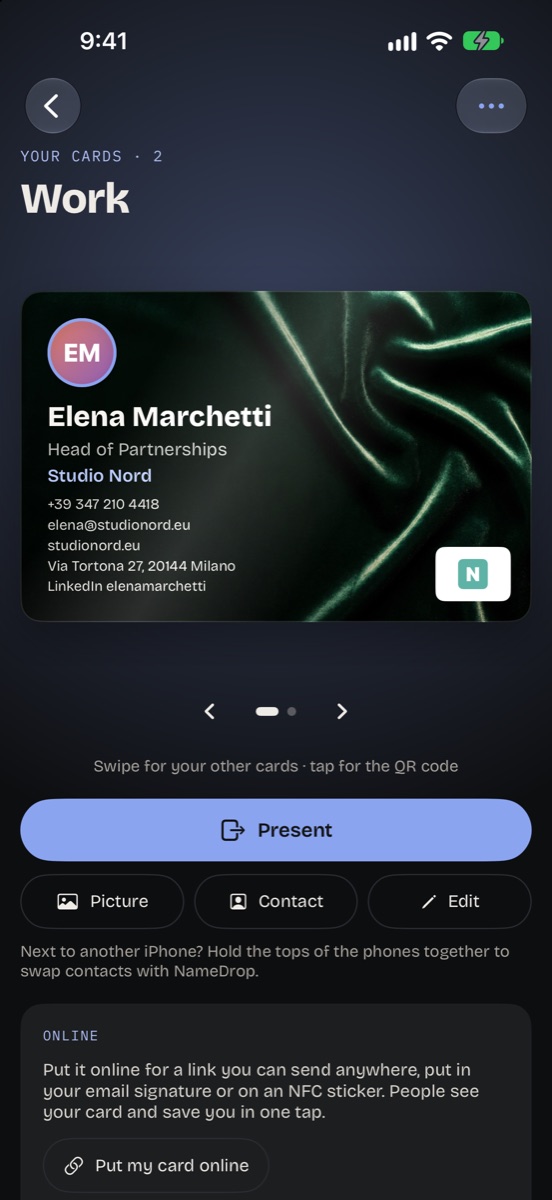
- Make your card in Metwith: your details, your photo and your logo. This part is free.
- In Your cards, tap Put my card online. Your card gets its own link on metwith.app.
- Tap Write to an NFC sticker and hold the top of your iPhone near a blank sticker or card.
- When it says Written to the sticker, it’s ready. Phones that tap it open your card.
Which stickers work
Any blank NTAG sticker or card: NTAG213, NTAG215 or NTAG216, sold in packs online. The sticker only holds a short link, so the smallest one is enough. Every iPhone that runs Metwith can write them.
Who can tap it
iPhone XS and later read NFC stickers without opening an app: hold the top of the iPhone near the sticker and tap the notification. Most Android phones read them too, with NFC turned on.
Where to put it
- On the back of your phone case
- On your badge holder at a fair
- On your stand, desk or shop counter
- On the back of your paper card
Change it, or take it offline
The sticker holds your card’s link, not your details. Change your card in Metwith and the online one follows, so the stickers you’ve handed out show the new details. Take it offline deletes your card from the server, and the sticker stops opening it.
Privacy
Only what’s on your card goes online. The page asks search engines not to list it, and only your iPhone can change it. How Metwith handles your data
Questions
Do I need to buy a special NFC business card?
No. Any blank NTAG sticker or card works, and you can write as many as you like.
Is there a subscription?
No. The online card and NFC stickers come with Metwith Pro: one payment, shared with your family.
Can I write over a sticker?
Yes, as long as it isn't locked. A locked sticker shows: This sticker can't be written to.
What about phones without NFC?
Show your QR code instead. Any phone camera reads it and saves you, and it's free.