 Metwith
How to organize business cards
A drawer of cards is only useful if you can find the right one, and remember why you kept it. The trick is the same on paper and on your iPhone: sort by where you met, and write one line on each person.
The short answer. Scan each card into your Contacts the day you get it, grouped by the event where you met, with a note and a tag on each person. Then search instead of sorting.
On paper
- A box or a binder with sleeves, one section per event or per year, not alphabetical: you remember where you met someone long after you forget their name.
- Write on the back: the date, the event and one line on what you talked about.
- Clear it out once a year. Cards from people you never followed up rarely get a second chance.
Paper has two weak spots: you can’t search it, and it isn’t with you when the person calls.
On your iPhone, with Metwith
- Start an event in Metwith for the fair, conference or trip. Every card you scan there remembers it.
- Scan the cards the same day. Metwith reads each one on your iPhone and keeps its photo with the person.
- Add a note and a tag while you remember: what they need, which product, hot or cold.
- Tap Save to Contacts. Everyone goes to your Contacts, in a list named after the event in iCloud.
- Find anyone later by name, company, note or event, as a list, as cards, or flipping through them.
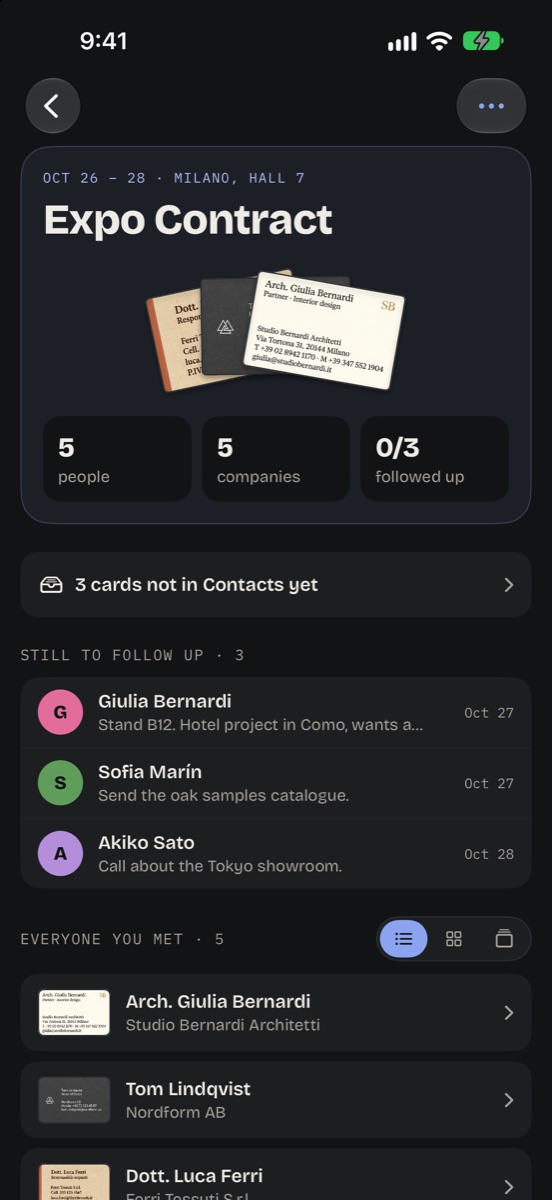
Cards you already have are caught before they become duplicates, and each person can have a follow-up day, so the organizing turns into answers. When you need everyone elsewhere, export them as vCards, or as a spreadsheet with Pro.
Questions
What's the best way to organize business cards?
By where you met, with one line on each person. Paper sorted by name loses the reason you kept the card; a scanned card with its event and a note keeps it, and search finds it in a second.
Should I keep the paper cards after scanning?
You don't need to: the photo of each card stays with the person in Metwith. Keep the ones that matter to you as objects.
Can I organize cards I already have in a drawer?
Yes. Start an event for them, or scan them into a past one, and add what you remember about each person.
Metwith is free for your first 25 cards and one event. No account, no subscription.
Download on the App Store